Τρίτη 23 Δεκεμβρίου 2008

Η Nvidia απογειώνει τα minibooks


H Nvidia ανακοίνωσε νέα Minibook πλατφόρμα που συνδυάζει τον επεξεργαστή Atom chip με το Geforce 9400M

Το Geforce 9400M chip γραφικών μπορεί να βελτιώσει τις επιδόσεις στην δημιουργία γραφικών και την επεξεργασία και αναπαραγωγή video πέντε και δέκα φορές αντίστοιχα, σε minibooks που χρησιμοποιούν τον επεξεργαστή της Intel Atom.

Σύμφωνα με αναφορά της Nvidia, o συνδυασμός αυτός είναι αρκετός για να δώσει 25 με 30fps σε ανάλυση 1024x768, στο γνωστό First Person Shooter παιχνίδι, Call of Duty 4!

Επιπλέον, η Nvidia έχει βάλει σαν στόχο όχι μόνο την δυνατότητα αναπαραγωγής 1080p full HD βίντεο αλλά και την δυνατότητα χρήσης σε minibooks, απαιτητικών λειτουργικών συστημάτων όπως τα Windows 7 και το Snow Leopard, με την προϋπόθεση ότι το minibook θα διαθέτει την απαραίτητη μνήμη RAM.

Η νέα πλατφόρμα αναμένεται στα μέσα του 2009 .

Δευτέρα 22 Δεκεμβρίου 2008

Makeover for Apple's Mighty Mouse?


Is it time for Apple's Mighty Mouse to get a tune-up?

That's the question many people on the Internet are asking as MacBlogz has published images of what it expects Apple to do with the multibutton mouse. Extrapolating from Apple's patents on multitouch, MacBlogz's prototype features a sleek profile and aluminum body.

The report notes that a 2007 patent application "arbitrary shaped grippable member" that would utilize positioning and multitouch detection to interpret a user's movement. Basically, it appears the button would be replaced by a multitouch trackpad. "In essence, it would act as one seamless area from which a user could scroll and pan by dragging a finger over the device's surface," the report says.

The prototype's aluminum body is drawn from a parallel with the iMac and MacBook, which have shed their white, plastic shell for aluminum. The change in materials would also eliminate the build-up of gunk on the edges, the blog suggests.

As far as shape goes, the prototype's lower profile would be "more versatile for complex gestures," while will maintaining enough height to accommodate its batteries.

The mouse may be still be in the dream stage, but it's one Apple users would embrace.

Σάββατο 20 Δεκεμβρίου 2008

imobilecinema (Flash player plugin for Safari)

iMobileCinema is a powerful Safari plugin for playing internet videos on your iPhone or iPod touch. You can watch millions of videos on any podcast site or blogs with it. Install it and visit Google Video, Youtube, or any other sites via Safari. Bunches of videos are waiting for you.

Watch the Demo:


WWW


Re: Imobilecinema (Flash player plugin for Safari)
« Reply #1 on: Yesterday at 11:07:13 pm »

iMobile Cinema

iMobileCinema is a powerful Safari plugin for playing internet videos on your iPhone or iPod touch. You can watch millions of videos on any podcast site or blogs with it. Install it and visit Google Video, Youtube, or any other sites via Safari. Bunches of videos are waiting for you.

Watch the Demo:


Install via Windows (PC)
For FW 1.1.4 to 2.2 --> Download Link(Ο πιο ευκολος τροπος)

Install via Cydia
v2.0 to v2.2 input this source: http://d.imobilecinema.com

Install via Installer
v1.1.4 input this source: http://d.imobilecinema.com

Install via PXL (iBrickr/Breezy)
1.1.1 to 1.1.2 -->Download Link
1.1.3 to 1.1.4 -->Download Link
2.0 to 2.2-->Download Link

Παρασκευή 19 Δεκεμβρίου 2008

iPhone 101: Reboot your iPhone for better gaming


One of the biggest comments on the recent SimCity announcement for the iPhone, other than being able to locate the SimCity International (link goes to the U.K. iTunes store) version of the game, was complaints that the game was crashing for some people.

This is not a new issue for graphically intense games for the iPhone and one of the solutions for solving this is very easy: Before playing your new game, reboot the iPhone.

Here's how to do it.

Update: As has been pointed out in the comments, a normal shutdown/startup process, or "soft reboot," should work fine: simply hold the power button down for 3 seconds and slide to power down. The "hard reboot" described here should only be used if your iPhone isn't responding to touches or the Home button -- it is not intended as regular maintenance. Thanks to all for the feedback.

[If your phone ever becomes completely unresponsive, you may need to do the 'hard reboot process described next -- but remember this is the equivalent of pulling out the power cord on your computer.] Hold down the Home and the Sleep/Wake buttons until your screen goes black, as shown at right. After a few seconds, you should see a sliding bar for powering off the phone. Ignore it and keep pressing those buttons. After about 20 seconds or so, the screen will go completely black and the silver Apple logo appears.

Once your phone goes through the rebooting process, launch your game. You shouldn't have any further problems with it. One word of warning: Rebooting the iPhone does drain your battery somewhat, so if you're pretty low on power you may find yourself unable to use the phone until after you're recharged it.
Why reboot your phone? The iPhone, like a regular computer, uses memory and system resources every time you launch a program. The typical iPhone user utilizes several applications at a time, often hopping back and forth between them. When a program that is heavy on system resources is launched, such as SimCity, if you haven't rebooted in awhile to refresh your iPhone's memory and resources, it could cause the program to crash.


I saw this tip posted on the App Store when I was purchasing Scrabble at the end of November and followed the advice and didn't have a single problem with Scrabble on my 1st generation iPhone. I repeated it with SimCity and, again, I'm not having any issues playing the game.

If that doesn't solve your issues, check out this list of iPhone troubleshooting tips.

iPhone thief caught thanks to MobileMe!


To say that MobileMe hasn't made everyone happy may be a bit of an understatement. We don't generally hear from the satisfied customers, but we have received a fair amount of email from dissatisfied users of Apple's "cloud computing" solution. Given the barrage of negativity, it's nice to hear a positive take now and then. TUAW reader Rob had just the thing ...

While at the dry cleaner one day, Rob's iPhone was stolen. He immediately chalked it up as gone forever, and proceeded to purchase a brand new one that same evening. It was the next day when unfamiliar contacts began to appear on the new phone. The (not-too-bright) thief was unwittingly supplying him with names and phone numbers of his or her closest friends, via the magic of MobileMe synchronization from the stolen phone to the cloud and eventually to his new phone. "It didn't take long for me to realize that MobileMe was leading me right to the thief!" wrote Rob.

Thanks to the fact that he caught on to it before he'd had time to remotely disconnect his account, MobileMe provided the groundwork for a little social engineering. Rob made quick work of wrangling a name and phone number from the provided contacts, supplying the police with everything they needed to get Rob his phone back. By the end of the night, he had his original iPhone in his possession.

There you have it, a MobileMe success story! Sure, this doesn't make up for the problems which have plagued MobileMe, but it's a great story. The recovered phone is "pretty much brand new," according to Rob, and is currently up for auction on ebay.

Πέμπτη 18 Δεκεμβρίου 2008

Metal Gear Solid Touch Revealed for iPhone


Solid Snake's next adventure will sidestep the "Xbox 360 versus PlayStation 3" debate by appearing on neither platform; instead, Konami's anthropomorphized Cold War allegory will be sneaking his way onto Apple's iPhone.

Metal Gear Solid Touch is scheduled for release in Spring 2009, reports Kotaku. The game is a completely original adventure set in the latter-day world of Metal Gear Solid 4 (read: Snake is a geriatric), and consists of 8 stages.

What would a Metal Gear Solid game be without unlockable content? Earning bonus points through gameplay will allow players to download special Metal Gear-themed iPhone wallpapers.

No price has been established for the title, though we expect to hear more details from Konami soon.

Image: Konami

Κυριακή 23 Νοεμβρίου 2008

New Macbook X-ray!

This is the new Macbook's x-ray photo!

Σάββατο 25 Οκτωβρίου 2008

Apple seeds iPhone Firmware 2.2 Beta 2 - and then unseeds it!

H Apple άρχισε να εκδίδει την iPhone Firmware v2.2 Beta 2 σε μια μικρή ομάδα προγραμματιστών:


Update: Apple has removed the update, leaving developers with access to only the “old” iPhone Firmware v2.2 Beta 1.

[Via appleiphoneapps]

Παρασκευή 24 Οκτωβρίου 2008

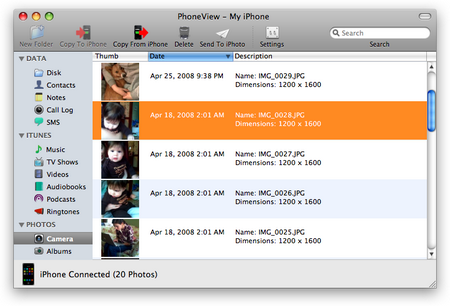
PhoneView: iPhone as a hard drive

Το PhoneView είναι μία εφαρμογή (μόνο για Mac) μέσω της οποίας μπορείτε να δείτε αλλά και να διαχειριστείτε το iPhone σας, σαν να είναι ο σκληρός σας δίσκος!


Με το PhoneView αποκτάτε πρόσβαση εύκολα και απλά σε όλο το διαθέσιμο υλικό σας:

- Χρησιμοποιήστε το iPhone σαν σκληρό δίσκο
- Πρόσβαση στα τραγούδια και στα βίντεο
- Δείτε και εξάγετε τα SMS
- Κατεβάστε τις εικόνες της κάμερας
- Δημιουργήστε, επεξεργαστείτε σημειώσεις
- Δείτε και εξάγετε ιστορικό κλήσεων
- Διαχειριστείτε τις επαφές σας

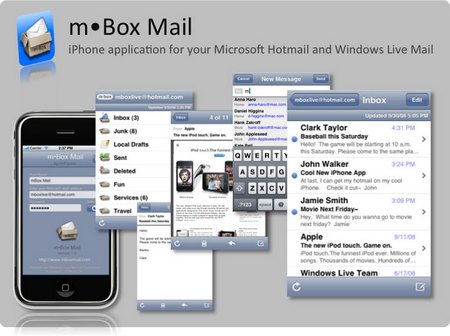
mBoxMail: Hotmail on your iPhone

Η default Mail.app εφαρμογή του iPhone έχει το μειονέκτημα ότι δεν υποστηρίζει Windows Live Hotmail. Το mBoxMail, όμως, έρχεται από την mFluent να αλλάξει τα δεδομένα προσφέροντας μια εφαρμογή η οποία μπορεί να υποστηρίξει Hotmail account στο iPhone!


Επιτέλους, μπορείτε να έχετε τα μηνύματα και τους φακέλους του Hotmail Account σας στην οθόνη του iPhone ανά πάσα στιγμή. Η εφαρμογή ΔΕΝ απαιτεί jailbreak και προσφέρει πλήρη λειτουργικότητα της υπηρεσίας Hotmail μέσα από το άνετο λειτουργικό του iPhone:


Το mBoxMail διατίθεται από το AppStοre στην τιμή των 7.99€

Παρασκευή 10 Οκτωβρίου 2008

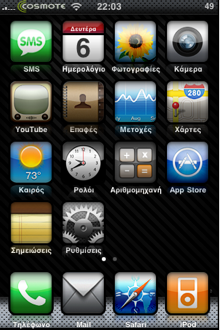
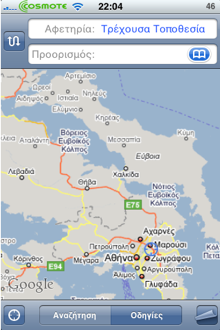
iGreek: Greek interface on iPhone

Ο Εξελληνισμός του interface του iPhone τελείωσε και πλέον μπορείτε απλά και γρήγορα να προσθέσετε το iGreek από το Cydia!


iGreek Features:

1. Πλήρης εξεληνισμός του μενού (πλην ελαχίστων εξαιρέσεων).
2. Αντιγράφει το Contact Sorting που έχετε επιλέξει οπότε εάν θέλετε να αλλάξετε sorting method, ξαναπερνάτε το iGreek από πάνω…
3. Δυνατότητα αφαίρεσης και επαναφοράς του Ρωσσικού μενού.

Thanks to L10nH34Rt & Minos


Cydia source (MinApps): http://www.ftp4u.gr/iphone/apt
Source

Παρασκευή 19 Σεπτεμβρίου 2008

QuickPwn 2.1 for Windows released!


Το QuickPwn 2.1 για Windows είναι γεγονός! Κατεβάστε το: Torrent file

(sha1) QuickPwn21-1.zip = f8124d0e8f31f64ef3272de8fbc679e1dd1f93a7

Mirrors

The following links are unofficial download mirrors, the files that are downloadable below have not been tested for authenticity. You download these files at your own risk, we accept no responsibility if your computer explodes or if it becomes part of a NASA attacking botnet, or even worse if your hands fall off mid-way during the use of these archives. Always check the files that you have downloaded against the published SHA1 sums. We would prefer that you downloaded the official bittorrent release above, but you can try these if you really don’t want to use bittorrent.

* http://i.omerc.net/QuickPwn21-1.zip

Blu-ray Support in Mac OS X 10.5.6?


After last week's release of the iPod Nano, iPod Touch and iTunes 8, we neglected to post our traditional rumor wrap up. In the end, however, our pre-event rumor roundup accurately spelled out the major releases.

The bulk of the information came from Kevin Rose who detailed a number of the changes accurately. Readers should find interesting that Rose also revealed some future details that have not yet materialized.

Specifically, Rose expects that Blu-ray support will finally be built into Mac OS X 10.5.6. Blu-ray is the next generation high definition video disc format that only recently "won" the format battle after major studios decisively chose it over HD-DVD. Apple has been a member of the Blu-Ray consortium for years but has not yet revealed their plans for Blu-ray support.

With the release of Mac OS X 10.5.5 earlier this week, Apple should begin work on Mac OS X 10.5.6. Built-in Blu-ray support into Mac OS X would open the door for Apple to finally incorporate Blu-ray drives into their Macs as well as Blu-ray support into their suite of iLife applications. The 10.5.6 update will not come before the rumored notebook revisions in October, but could conceivably be ready by Macworld San Francisco 2009.

[Via Macrumors.com]

Πέμπτη 18 Σεπτεμβρίου 2008

New MacBooks already shipping out?


Redesigned MacBooks may already be enroute to stores, claims an analyst from Citigroup. Richard Garner cites "field checks," which suggest that the shipment process has begun. Garner says he has also learned of the computers' main features, which should include a "very thin" aluminum casing, LED backlighting, and an "aggressive entry-level price point." Some analysts have suggested that the cheapest MacBook could drop in cost to $999.

When new MacBooks might go on sale is unknown, but a previous report has pointed to October 14th. An announcement was originally expected by many to have come on September 9th, but Apple does not typically mix its September iPod presentations with information on Macs.

Garner is meanwhile optimistic about results for Apple's September quarter, predicting revenue of $8.3 billion, above The Street's estimate of $8.1 billion. EPS is likewise expected to be $1.20 rather than $1.11. The company's gross margins may also be better than anticipated, due to harsh drops in prices for DRAM, NAND and flat-panel displays. iPod giveaways and price cuts have previously been forecast as diminishing Apple profits.

[via electronista.com]

Macbook Touch by Apple?


What do you think of the Apple's Macbook Touch? If this comes true ever, it will be best seller!!!

Τετάρτη 17 Σεπτεμβρίου 2008

Star Wars: The Force Unleashed

Το “Star Wars: The Force Unleashed“, ένα από τα πιο πολυσυζητημένα iPhone games, είναι πλεόν διαθέσιμο από το App store!

Star Wars: The Force Unleashed available for iPhone
THQ wireless has released the newest addition to its line of Star Wars games for the iPhone, The Force Unleashed. Gamers take the role of Darth Vader's secret apprentice, personally trained by the Sith Lord. The last of the Jedi must be hunted and eliminated, using grip, lightning, Jedi mind tricks, and other tools controlled with the phone touch screen and accelerometer.

Battles are fought across galaxies, using the adapted Force Powers. The player can fight to advance beyond the control of Darth Vader. THQ's "CellWeaver" technology is used to enhance the game controls and take advantage of the phone's unique inputs. Star Wars: The Force Unleashed is available from iTunes for $10.

Το “Star Wars: The Force Unleashed” κοστίζει 7.99€ (για όσους επιθυμούν να το αγοράσουν από το Appstore).

Εμείς φυσικά θα το κατεβάσουμε δωρεάν!
http://www.themonkeysball.com/info/290461039/

Δευτέρα 15 Σεπτεμβρίου 2008

Greek keyboard - Ελληνικό πληκτρολόγιο στην iPhone firmware v2.1

Αυτό που δεν κατάφερε η Apple με την v2.1 μας το προσφέρει μία ομάδα ταλαντούχων παιδιών από το forum του myphone.gr:

Το Ελληνικό πληκτρολόγιο στο iPhone - iPod Touch είναι πλεόν γεγονός!

Προσοχή: Το Ελληνικό πληκτρολόγιο είναι συμβατό ΜΟΝΟ με την iPhone v2.1. Όσοι έχετε v2.0 - v2.0.1 - v2.0.2 ΜΗΝ επιχειρήσετε να το εγκαταστήσετε! (Η μέθοδος στηρίζεται σε τροποποίηση του TextInput_ru το οποίο είναι βασισμένο σε αυτό του v2.1) Αναβαθμίστε σε v2.1 και έπειτα ακολουθήστε τον οδηγό.


Ο παρακάτω οδηγός προυποθέτει στοιχειώδεις γνώσεις SSH. Εάν δεν γνωρίζετε/δεν καταλαβαίνετε τον οδηγό καλό θα ήταν πριν προχωρήσετε να ζητήσετε κάποια βοήθεια.


1. Κατεβάζουμε από Cydia το mobileterminal, το openssh και το ldid.

2. Κατεβάζουμε τo αρχείo: [ενα απο ολα...Οσο ανεβαινουμε στις beta τοσες περισσοτερες βελτιωσεις υπαρχουν]
beta5
Greek Keyboard
beta4
Greek Keyboard
beta3
Greek Keyboard
(το ΤextΙnput_gr θελει μετονομασια σε TextInput_ru)
beta1
Greek Keyboard


(Περιέχει τα αρχεία TextInput_ru (signed version), TextInput_ru.artwork & keyboard-ru.plist σε .zip. Ξεζιπάρετέ τα!)

3. Τα αρχεία TextInput_ru (signed version) και TextInput_ru.artwork πάνε στην τοποθεσία /System/Library/TextInput/TextInput_ru.bundle/

4. Το αρχείο keyboard-ru.plist πάει στην τοποθεσία /System/Library/Frameworks/UIKit.framework/

5. Κάνουμε επανεκκίνηση της συσκευής.

6. Ενεργοποιούμε το Ρωσικό πληκτρολόγιο από Settings->General->Keyboard->International Keyboards

7. Για να το επιλέξουμε πατάμε στην "Υδρόγειο" (π.χ. μέσα από την εφαρμογή SMS).


Σημειώσεις:

1. "α": Δυνατότητα εισαγωγής του κώδικα για να λαμβάνετε αναφορές παράδοσης, ανάλογα με τον παροχέα σας. Ο παροχέας επισημαίνεται με το αρχικό γράμμα του ονόματος του.
2. "σ": Δυνατότητα εισαγωγής του τελικού σίγμα "ς".
3. "Υ": Δυνατότητα εισαγωγής διαλυτικών "Ϋ".
4. "Ι": Δυνατότητα εισαγωγής διαλυτικών "Ϊ".
5. "υ": Δυνατότητα εισαγωγής διαλυτικών και διαλυτικών με τόνο "ϋ", "ΰ".
6. "ι": Δυνατότητα εισαγωγής διαλυτικών και διαλυτικών με τόνο "ϊ", "ΐ".

Thanks to minos197 (HeXoR - TextInput_ru & keyboard-ru.plist) - jim788e - pperiklis (1st BetaTester)- L10nH34Rt (ArtWorks - TextInput_ru.artwork) - Snollygoster - Konsti (GreekSort) - Lakism13 - gbil

Special thanks to Martin Spasov

[Via myphone.gr]

Σάββατο 13 Σεπτεμβρίου 2008

Featured forum post: Ringtones in iPhone (without the 40sec limit)


Ο user sotos_2002 του iPhoneHellas forum δημοσίευσε ένα ενδιαφέρον post σχετικά με το πως εισάγουμε ένα ολόκληρο τραγούδι ως Ringtone στο iPhone (χωρίς τον περιορισμό των 40”).

1) Πηγαίνετε στο iΤunes-> Preferences. Στην καρτέλα General, στο κέντρο περίπου, υπάρχει ένα κουμπί “Import Settings” πατήστε το και στο νέο παράθυρο που ανοίγει στο “Import Using” βάλτε AAC Encoder.

2) Διαλέξτε το κομμάτι που θέλετε μέσα από την λίστα σας και πατήστε δεξί-κλικ-> Create AAC version. Όταν τελειώσει η διαδικασία πατήστε δεξί κλικ->show in windows explorer στο αρχείο που δημιουργήθηκε (έγινε αυτόματα import στην λίστα σας).

3) Στο παράθυρο που σας εμφανίστηκε έχετε το τραγούδι που μετατρέψατε με κατάληξη “.m4a” πατήστε δεξί κλικ->Μετονομασία και αλλάξτε την κατάληξη σε “.m4r”

4) Συνδεθείτε μέσω ssh στο iPhone και παγαίνετε στην διαδρομή “/private/var/stash/Ringtones.UUhUh3″ και εκεί με drag & drop μεταφέρετε το αρχείο “.m4r” που μετονομάσατε.

5) Αν πάτε στο Settings->Sounds του iPhone θα το βρείτε στην λίστα με τα default Ringtones.

Συζητήστε στο forum: iPhone Ringtone (no 40sec limit)

[Thanks to sotos_2002]

Disable iPhone’s autocorrection WITHOUT Jailbreak!


Η μέθοδος στηρίζεται στο ότι το auto-correct, δεν λειτουργεί εάν πληκτρολογείς μπροστά πίσω από έναν χαρακτήρα! Στην ουσία δεν το απενεργοποιούμε αλλά το ξεγελάμε ώστε να μην λειτουργεί!

Εισάγετε ένα γράμμα (π.χ. Q) και μετακινήστε τον κέρσορα (με το μεγενθυντικό φακό) πίσω ακριβώς από το γράμμα. Τώρα μπορείτε να γράψετε ότι θέλετε χωρίς λειτουργεί το autocorrection!

Απλά θυμηθείτε στο τέλος να σβήσετε το Q :-)

iPhone firmware v2.1 released!

Η iPhone firmware v2.1 έγινε διαθέσιμη για download μέσω του iTunes! Το μεγέθους 237.8MB update προσφέρει σύμφωνα με την Apple:

* Decrease in call set-up failures and dropped calls
* Significantly better battery life for most users
* Dramatically reduced time to backup to iTunes
* Improved email reliability, notably fetching email from POP and Exchange accounts
* Faster installation of 3rd party applications
* Fixed bugs causing hangs and crashes for users with lots of third party applications

* Improved performance in text messaging
* Faster loading and searching of contacts
* Improved accuracy of the 3G signal strength display
* Repeat alert up to two additional times for incoming text messages
* Option to wipe data after ten failed passcode attempts
* Genius playlist creation

αλλά και μερικά ακόμη features τα οποία δεν είναι documented και τα οποία ανακαλύπτουμε σιγά σιγά μετά την αναβάθμιση:

- Όταν αναβαθμίζεται ένα app μέσω του iTunes, το εικονίδιο ΔΕΝ αλλάζει θέση! Παραμένει στη θέση που είχε στο Sprinboard αντί να μεταφέρεται στην αρχική Homescreen!

- Ο χώρος τον οποίο καταλαμβάνουν τα apps πλέον εμφανίζεται στο iTunes usage bar με πράσινο χρώμα!

Παρασκευή 29 Αυγούστου 2008

Zibri is cooking something!

As he refers to his blog the Ziphone is in test! Let's see how far the war with Dev-Team will go!

Testing phase #1
I'm testing at the moment a very preliminary version of the next ZiPhone..
Let me tell you it's impressive.
A very few testers screamed when they saw how simple is this.
I can't tell you more for now..
It's really to early.

Via Ziphone Blog

WinPwn 2.5 release imminent

Η ανάπτυξη του WinPwn v2.5 ολοκληρώθηκε και η εφαρμογή θα είναι διαθέσιμη για κατέβασμα από σήμερα, στις 2pm EST (Ώρα Ελλάδος: 19.00 GMT)

Μερικά από τα νέα features του WinPwn 2.5 είναι:
- QuickPwn support (2.0/2.0.1/2.0.2)
- DFU helper
- Automatic updater (no more downloading new installers)


[Via WinPwn.com]

Παρασκευή 25 Ιουλίου 2008

iPhone firmware 2.1…


Και ενώ πολλοί από εμάς δεν έχουμε βάλει ακόμα το firmware 2.0 στο iPhone μας, η Apple άρχισε να διανέμει το 2.1 (προσοχή όχι το 2.0.1) στους developers…

Σύμφωνα με τις πρώτες ενδείξεις, το νέο firmware “ξεκλειδώνει” (επιτέλους!) την τεχνολογία core location, η οποία παρέχει (από το gps chip) στις εκάστοτε εφαρμογές πληροφορίες για την κατεύθυνση κίνησης, το υψόμετρο, την ταχύτητα κτλ. Με άλλα λόγια navigation! Μένει να δούμε πόσο γρήγορα θα ανταποκριθούν οι developers (μαζί με το νέο firmware δώθηκε και το αντίστοιχο SDK) και κατά πόσο θα αξιοποιήσει αυτές τις νέες δυνατότητες και το Google Maps, που σίγουρα δε θα κάτσει με σταυρωμένα τα χέρια…

Τετάρτη 23 Ιουλίου 2008

Super Monkey Ball for FREE!

Όσοι έχετε αναβαθμίσει στην iPhone Firmware v2.0 (βλ. Pwnage v2.0 Tutorial (Mac) - Pwnage 2.0 Tutorial (Windows)) θα πάρετε ένα μικρό δωράκι! Ένα από τα καλύτερα games του App store για το iPhone, το ‘Super Monkey Ball’ μπορεί να γίνει δικό σας δωρεάν!


Με ποιόν τρόπο;

1. Make sure you are on Firmware 2.0

2. Download the file and extract the Monkey Ball.app folder to your desktop.

3) Copy Monkey Ball.app into /Applications via SSH and set permissions to 775

4) Create a folder called “Documents” (case sensitive!) in /var/mobile/ and set permissions to 777

5) Reboot your iPhone. Enjoy!

If you got problems with uploading the app via Cyberduck, download all the apps in the folder /Applications to your desktop. Delete /Applications. Create the folder /var/mobile/Applications2 (you may call it Apps or Programs or whatever you like) and copy all your applications into that folder.

Now open terminal, enter “ssh root@IPHONES_IP_ADDRESS”, if you are prompted to accept / authorize the key enter “yes”. Enter the password for the iPhone, “alpine”, as you’ll know.

Now, the only thing left to do is to create the symlink:

“ln -s /var/mobile/Applications2/ /Applications”.

You may copy “endless” applications into “/Applications” now, because it’s now a symlink pointing to the 8GB partition of the iPhone.

[Via Haklabs]

iPhone 3G coming to Greece in 22 August !

Σύμφωνα με το MacWorld, η Apple ετοιμάζεται να διαθέσει το iPhone 3G σε 20 ακόμη χώρες στις 22 Αυγούστου! Η ανακοίνωση της Apple έγινε κατά την διάρκεια συνεδρίου για τα οικονομικά αποτελέσματα του τρίτου τετραμήνου, από τους Tim Cook (chief operating office) και Peter Oppenheimer (chief financial officer).


Η αρχική διάθεση του iPhone 3G έγινε σε 21 χώρες στις 11 Ιουλίου, με την Γαλλία να ακολουθεί στις 17 Ιουλίου ως 22 χώρα, και ήδη παρουσιάζονται μεγάλα προβλήματα όσον αφορά την κάλυψη της ζήτησης!

Ρίχνοντας μία ματιά στις 50 χώρες οι οποίες περιμένουν το iPhone 3G (coming soon), δηλώνουμε συγκρατημένα αισιόδοξοι!

[Via MacWorld]

Κυριακή 20 Ιουλίου 2008

Pwnage 2.0 Tutorial (Mac)

Pwnage 2.0 Tutorial για χρήστες Mac:

1) Δημιουργήστε έναν φάκελο στο desktop. Μέσα σε αυτό θα πρέπει να υπάρχουν τα εξής:

Τα 2 bootloader (link), το Pwnage 2.0 (link) - (link), και το firmware 2.0 (1st Gen iPhone 2.0 5A347 (link)


Ανοίξτε το Pwnage 2.0.


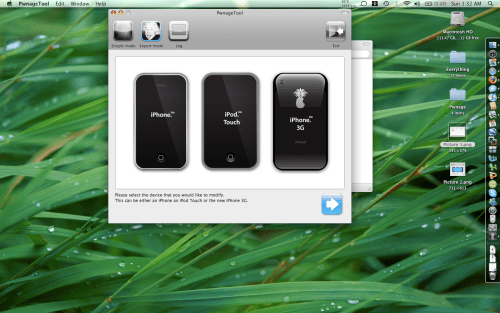
Επιλέξτε το Expert Mode (επάνω αριστερά)


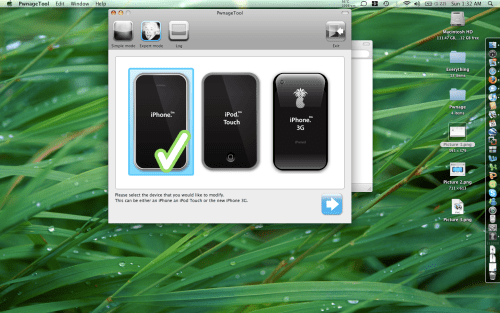
Επιλέξτε το iPhone. Ένα check-mark θα εμφανιστεί.


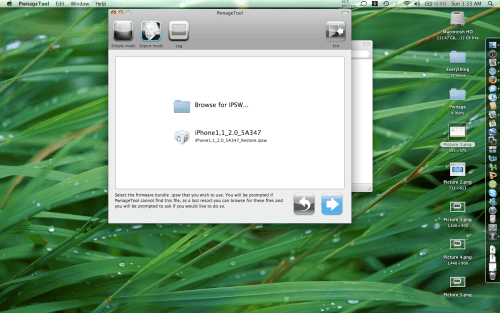
Επιλέξτε το μπλέ βελάκι (κάτω δεξιά). Θα σας φέρει στην σελίδα “Browse for IPSW”.


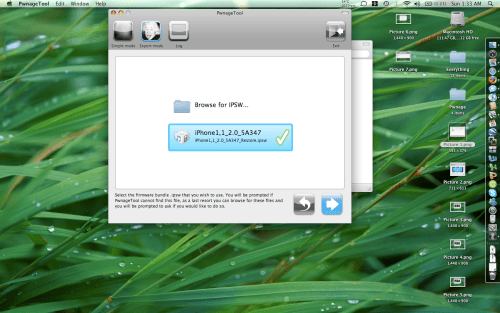
Βρείτε το IPSW και επιλέξτε το.


Επιλέγοντας το, ένα checkmark θα εμφανιστεί δίπλα στο εικονίδιο του. Στη συνέχεια πατήστε το μπλέ βελάκι (κάτω δεξιά).


Θα εμφανιστεί ένα menu με 7 επιλογές.


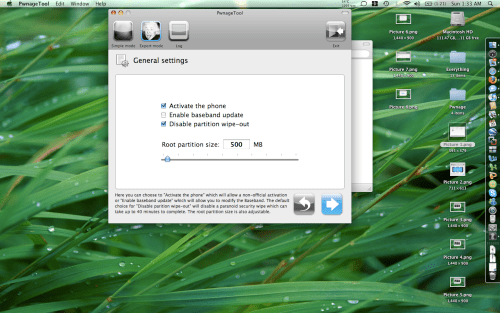
Το ‘General settings’ σας επιτρέπει να ορίσετε το partition size. Επιλέξτε τα: Activate the phone και ’Disable partition wipe-out’. ΜΗΝ επιλέξετε το ‘Enable baseband update’ !!! Πατήστε το μπλέ βελάκι (κάτω δεξιά).


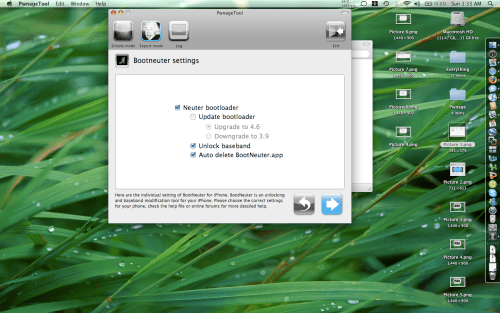
Στα ‘Bootneuter settings’ επιλέξτε τα: ‘Neuter bootloader’, ‘Unlock baseband’ και ‘Auto-Delete BootNeuter.app. Δεν χρειάζεται να αναβαθμίσετε τον bootloader εκτός και νιώθεται την ανάγκη να έχετε τον 4.6. Πατήστε το μπλέ βελάκι (κάτω δεξιά).


to be continued...

Pwnage 2.0 Tutorial (Windows)

Pwnage 2.0 Tutorial για χρήστες Windows από τον ΒigBoss:

Step 1: Use WinPWN 1.0 To PWN Your 1.1.4 iPhone. If you need WinPWN Get it here: (link)

Step 2: Install BootNeuter (Available Via Installer).

Step 3: Run BootNeuter and have it Neuter your iPhone

Step 4: Make sure your iTunes version is at 7.7

Step 5: Grab a pre-created IPSW Made with PWNAGE 2.0 Mac. If you dont have one made you can grab one here: (link)

Step 6:Put your phone into recovery or DFU mode.

Step 7: In iTunes Shif+Click the Restore button and find your custom IPSW Firmware file.

[Via Sleepers.net]

Pwnage Tool 2.0 Released

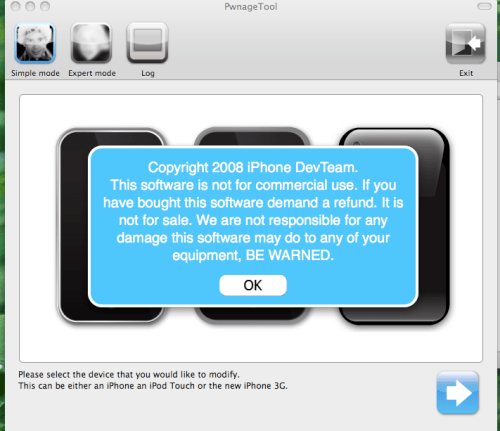
Κυκλοφόρησε σήμερα η πρώτη έκδοση του PwnageTool 2.0 από την Dev-Team (προς το παρόν μόνο για Mac):


Pwnage 2.0 features:


# Activate/Jailbreak/Unlock του iPhone 1st gen με firmware 2.0.
# Activate/Jailbreak του iPod Touch με firmware 2.0.
# Activate/Jailbreak του iPhone 3G


Προς το παρόν το PwnageTool 2.0 δεν προσφέρει τη δυνατότητα unlock στα iPhone 3G και για τον λόγο αυτό η εγκατάσταση του bootneuter είναι άσκοπη. Το ξεκλείδωμα του baseband του iPhone 3G αναμένεται (σύντομα?) και θα περιληφθεί στην επόμενη έκδοση του PwnageTool. Ωστόσο, οι χρήστες των iPhone 3G δεν θα μείνουν (εντελώς) παραπονεμένοι καθώς παρέχεται η δυνατότητα jailbreak και εγκατάστασης εφαρμογών από τον Installer και το Cydia.

To PwnageTool 2.0 δεν προσφέρει (στην τωρινή του έκδσοη) ενσωματωμένο τον Installer, καθώς βρίσκεται στο στάδιο της ανάπτυξης (beta 4).

Περιμένουμε περισσότερες λεπτομέρειες από την Dev-Team για το εργαλείο. Μέχρι τώρα έχουμε μερικές σημειώσεις με διευκρινήσεις για τυχόν προβλήματα που ίσως προκαλέσει η εφαρμογή.

Note 1: Just to clear up some confusion over what this actually does: Υes, it jailbreaks and unlocks older iPhones, and jailbreaks iPhone 3Gs and iPod Touches. We only support the 2.0 firmwares.

Note 2: If you get Error 1600 from iTunes (or if you see in your log a failure to prepare x12220000_4_Recovery.ipsw), try: mkdir “~/Library/iTunes/Device Support” ; if that directory already exists, remove any files in it. Then re-run PwnageTool.

Note 3: If DFU restores are giving you trouble, another route to pwned 2.0 for 1G owners is to use our first pwnage at 1.1.4. Once you are pwned there, you can do a normal recovery-mode restore to your custom 2.0 ipsw. BTW the iPhone does *not* need to be pre-pwned to be able to DFU-restore into a pwned ipsw — it needs to be pre-pwned only for normal recovery-mode restores of custom ipsw’s.

Μπορείτε να κατεβάσετε το PwnageTool 2.0 από τα παρακάτω Mirrors:

Mirror 1 - Mirror 2

Παρασκευή 11 Ιουλίου 2008

App store: Day 1 statistics

App store: Day 1 statistic analysis:

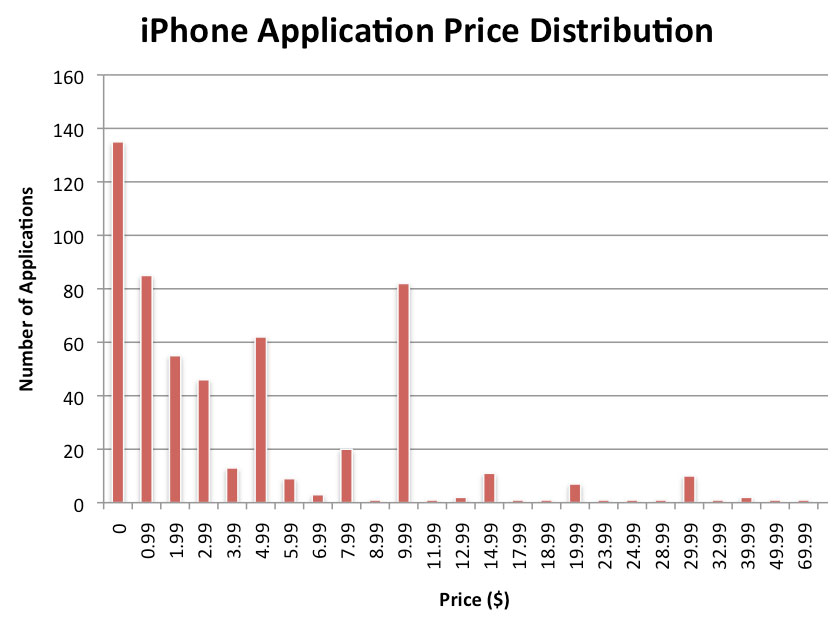
Περίπου 70% των διαθέσιμων apps είναι είτε δωρεάν είτε με τιμή κάτω των $5, σύμφωνα με την ανάλυση της PinchMedia, σε ολόκληρο το δείγμα των 552 διαθέσιμων apps.


Από το σύνολο των 552, η PinchMedia μέτρησε 135 δωρεάν apps. Οι τιμές των υπολοίπων apps ξεκινάνε από τα 99 cents και φτάνουν τα $69.99. Οι τιμές τις οποίες συναντάμε περισσότερο είναι:-

- 99 cents (85 apps)

- $9.99 (82 apps)

- $4.99 (62 apps)

[Via PinchMedia]

iPhone1,2_2.0_5A347_Restore.ipsw is out!


Κρυμμένο μέσα στα XML files, εντοπίστηκε το url για την iPhone 2.0 Firmware το οποίο και μπορείτε να κατεβάσετε από τους servers της Apple!

Πριν σας δώσουμε το download link, μερικές απαραίτητες διευκρινίσεις-προειδοποιήσεις:

Can not be used for iPod touch!This build is slightly higher than the one of the latest iPhone Firmware Beta (5A345) which was also spotted on shipping iPhone 3Gs

From Apple Support: Normally if you choose to update, the iPhone or iPod touch software is updated but your settings and media are not affected. If your device currently has a software version prior to 2.0 (1.x) and you are updating to software version 2.0 or later, all data on your device will be erased in order to perform install the new software. In this case, iTunes will offer to create a one-time media backup of your device depending on what content is on your device and what content is stored in the iTunes Library you are connected to. You should ensure that you have enough free space on your Mac or PC to accommodate a backup that matches the capacity of your iPhone or iPod touch (4 GB, 8 GB, 16 GB, or 32 GB) if you proceed with the this backup.

ΠΡΟΣΟΧΗ: Όσοι έχετε unlocked/jailbroken iPhones πρέπει να γνωρίζετε πως μετά το update στην version 2.0 το iPhone γυρίζει σε locked κατάσταση. Προς το παρόν δεν υπάρχει κάποιο εργαλείο για το unlock της version 2.0!!! (Αν και το περιμένουμε σύντομα από την Dev-Team)

Download iPhone1,2_2.0_5A347_Restore.ipsw

Δευτέρα 9 Ιουνίου 2008

iPhone 3G: black (8GB) white (16GB)

To iPhone 3G είναι γεγονός! Ας δούμε βήμα προς βήμα το χρονικό της αναγγελίας του:

11:32 am Steve is introducing the iPhone 3G !!!

11:33 am Apple has learned so much with the first iPhone. They have taken everything they’ve learned and more and created the iPhone 3G. Even thinner, black plastic back, solid metal buttons, same gorgeous display, camera, flush headphone jack, and dramatically improved audio.


11:35 am 3G vs EDGE:

Comparing download speeds between 3G and EDGE. 3G finished in 21 seconds. EDGE finished in 59 seconds.


11:36 am 2.8X faster:

Approaching WiFi speeds (WiFi scored 17 seconds). When compared to other 3G phones (Nokia N95 and Treo 750), the iPhone is 36% faster!


11:38 am 3G has great battery life on iPhone: 300 hours of standby, 2G talk-time now has 10 hours (as opposed to 5), 5 hours of 3G talk-time (most phones only have 3 hour 3G talk time), 5 to 6 hours of high-speed browsing, 7 hours of video, 24 hours of audio.

11:38 am GPS support now integrated into the iPhone!

11:39 am With GPS, the iPhone can do tracking. A pulsating dot is moving across the Google map as a car drives down Lombard street.

11:42 am Checking list:

Checking off 3G from the list of challenges.

The second challenge, enterprise support, is fully built-in and can be checked off.

The third challenge, third party application support, can also be checked off.

The fourth challenge, more countries, can be checked off (China, Japan, Australia, etc. 70 countries total.)

11:45 am Now on to the final challenge — affordability. Started at $599 for an 8GB iPhone, now $399.

The iPhone 3G 8GB will sell for $199, $299 for the 16GB ( white version available for 16GB)

11:46 am The iPhone 3G will be available July 11th in 22 countries.

The maximum price around the world is $199 !!!

Πριν από την ανακοίνωση του iPhone 3G, είχαμε 1.30 ώρα απίστευτης βαρεμάρας με παρουσιάσεις Demo app που θα δούμε στο Appstore, αλλά και την παρουσίαση του MobileMe, της νέας υπηρεσίας η οποία θα αντικαταστήσει το .Mac.

Τετάρτη 28 Μαΐου 2008

iPhone 3G case molds from Griffin leaked

Το Engadget έχει μία ενδιαφέρουσα (?) φωτογραφία η οποία δείχνει τα καλούπια κατασκευής των cases της Griffin για το iPhone 3G. Ακόμη περισσότερο ενδιαφέρον έχει η 3-D αναπαράσταση του ίδιου του iPhone 3G (!),σύμφωνα πάντα με τις διαστάσεις των καλουπιών:
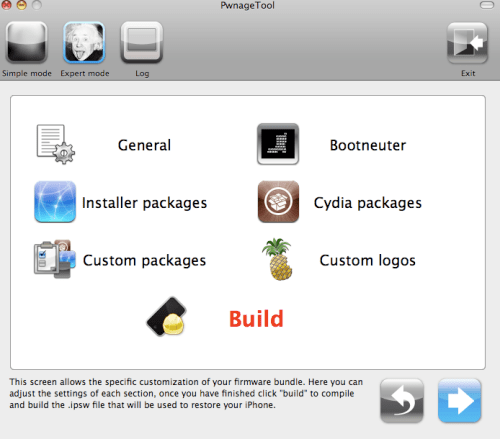


Δείτε το 3-D model του iPhone 3G (based on the case molds):

iPhone 3G leaked photos

Όσο πλησιάζουμε στις 9 Ιουνίου και στο WWDC τόσο πληθαίνουν και οι ‘iPhone 3G leaked photos‘. Οι τελευταίες μας έρχονται από το iPhoneclub.nl και το MacFreak.nl και μοιάζουν αρκετά με μία leaked photo που είχαμε παρουσιάσει πριν από μερικές ημέρες.


iPhoneSpot.gr | The right place for your iPhone